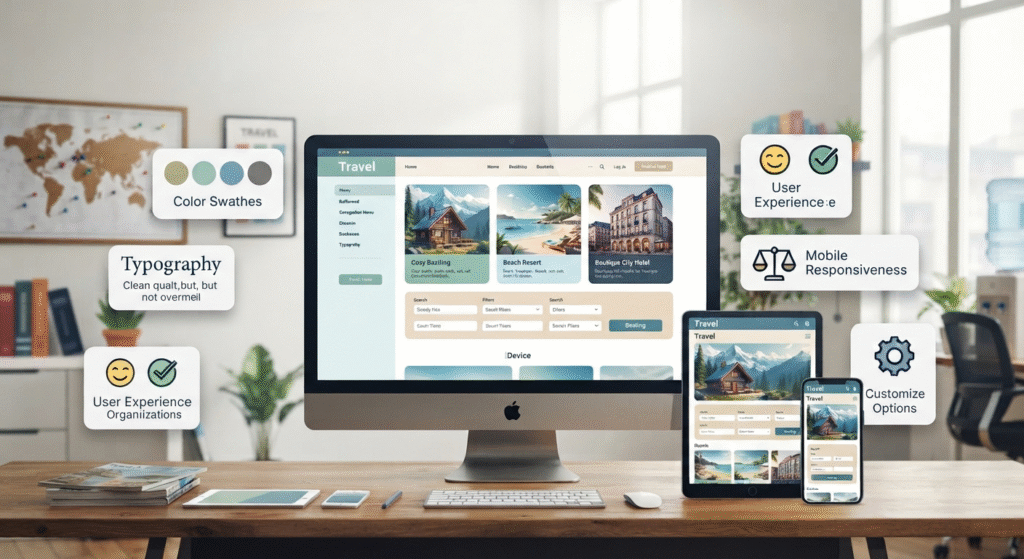
You don’t need a big budget or a developer on call to build a good travel website. If you run a travel & accommodation agency, manage a hotel, sell holiday packages, or just write about your trips, the goal is the same: help people find what they’re looking for without having to hunt for it. That’s where the right theme comes in. Moderate themes has designs made for travel sites, with layouts that show off your destination photos, explain what you offer, and nudge visitors toward the next step, whether that’s booking, calling, or sending an inquiry. ThemeHolt also has templates and tools that take some of the hassle out of WordPress, so you don’t need much technical know-how to get going. Mobile matters a lot here. Plenty of people plan trips from their phones, flicking through options on the train or in a spare five minutes, so your site has to look good and load fast on a small screen. The design only gets you so far. What actually helps someone decide is the practical stuff: how booking works, how to reach you, what other travelers said about you, and maybe a guide or two for the places you cover. A solid WordPress theme saves you some money and a lot of setup time, and the site looks tidy from the start. After that, don’t overthink it. If the pages are simple and the information is useful, people will hang around and have a proper look.
Explore Travel & Accommodation Website Templates
A tour operator, a hotel and a travel blogger all need different things from a website, so there’s no one layout that suits everyone. If you sell holiday packages, you’ll want those front and center. And if you write about your trips, your articles, destination guides and photos should take the lead. The travel & accommodation category covers a fair range of these. Moderate themes can help you find a suitable design for your website. It’s made for outdoor adventure businesses, and it includes an event calendar and booking tools. That’s useful if you run set treks or group trips.
- Booking and enquiry options: Check if moderate themes support bookings or need a plugin.
- Image galleries: Choose layouts that display clear photos of rooms, treks, and places.
- Mobile layout: Test the demo on your phone to ensure easy navigation and readable text.
- Room for content: Choose space for packages, travel guides, FAQs, and customer reviews.
Why Choose a Suitable Theme for Your Travel Website?
Most people check out your website long before they ever contact you. They’re looking at destinations, comparing a few options, and trying to work out why they should go with you and not someone else. If the site is confusing, they won’t stick around to find out. For travel and accommodation, the trick is balance. Moderate themes from Themeholt can help you choose a design that combines attractive photos with useful information. You need photos that make people want to go, but you also need the boring practical stuff: what’s included, what it costs, and how to book.
- Make the menu obvious: Keep destinations, packages, accommodation and contact details easy to find.
- Use real photos: Show clear photos of actual places, rooms and activities to build trust.
- Keep each page simple: One heading, a bit of text, one button. Pile on more and most people just scroll past.
- Check the store page: Open the Store Page and preview the demo to check theme features before buying.
Tips for Improving Your Travel Website
A nice design won’t save a slow site. If pages take ages to load, people are gone before they’ve seen a single photo. Before you click Shop Now, look through the sample pages and see if they match your business goals. Someone comparing your trip with two others wants the basics fast, where it goes, what’s included, what the rooms or facilities are like, and about what it’ll cost. Moderate themes can help you choose a suitable website design for the travel & accommodation industry, but the content still needs to be clear and useful.
- Write useful page content: Explain your services, use moderate themes for a suitable design, and make your contact details easy to find.
- Break up long chunks of text with headings: Nobody reads a wall of words on a travel site. They scan, so give them something to scan.
- Check mobile performance: Tap the buttons, fill in the form, check the photos load. It’s a five-minute job that catches a lot of embarrassing problems.
- Review your SEO basics:Use clear page titles, simple descriptions, and natural language.
Frequently Asked Questions
- What are moderate themes?
Just a category on ThemeHolt. You scroll through the designs and pick whichever suits your site and the features you want. - Can a beginner use a travel & accommodation template?
Yes, most are easy enough. You get a ready-made layout, so there’s no blank page to stare at. How smooth it is depends on the theme and what it needs to run. - Can I change the design?
Usually, though it varies by theme. Text, images and colors are normally easy to swap, and some let you move the layout around too. - Do I need plugins?
Not for a basic site. But if you want online booking, an enquiry form or better SEO tools, you’ll likely add a plugin or two. - How do I choose a theme?
Make a short list of what you can’t live without, like a gallery, booking, or a layout that works on phones. Then check each theme against it before paying.
Conclusion
A travel & accommodation site is much easier to build if you’ve got a rough plan before you touch a theme. Moderate themes is a fair place to start, but the theme is only the shell. What makes the site work is what you put in it. Don’t just go for whatever looks best in the preview. Flick through a few, check which features they actually come with, and pick the one that suits what you do. We also sell Elementor Kits and SEO tools, so have a look at those while you’re there. After that, make it your own. Rewrite the pages in your words, and update things when your prices or details change. Stuck on which one to pick? Read the product pages on the ThemeHolt store. And if something doesn’t make sense or you need technical help, the team is happy to answer through the site. Need help choosing a suitable website design? Visit our website to review its available products and learn more about the features offered with each option. You can also contact the team through the website if you have questions about a product or need technical support.


